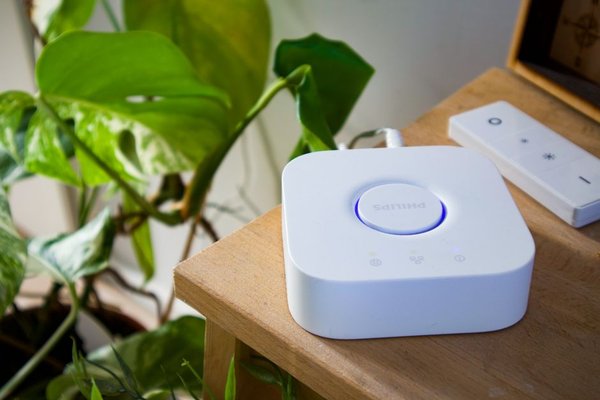

A smart home hub can make everyday devices work together, but the wrong one can turn a simple upgrade into incompatible apps and expensive replacements. The best buying decision starts with your existing lights, plugs, locks, and sensors—not a flashy feature list. This smart home hub buying guide focuses on the connections you need now and the compromises hidden behind familiar compatibility logos.
Check Your Devices Before Choosing a Hub
Make an inventory of your smart devices. Record each brand, model, wireless protocol, and controlling app. A Zigbee light, for example, will not necessarily connect directly to a Matter controller. It might need a compatible Zigbee bridge that exposes the light to your chosen platform.
Check manufacturer compatibility pages for exact models rather than relying on a generic “works with” badge. Note essential functions too: a lock might connect successfully but offer fewer settings outside its manufacturer’s app.
Make a Simple Compatibility Matrix
For each candidate hub, mark devices as directly supported, supported through a bridge, or unsupported. Include features you would lose. This exercise is more useful than a smart home hub comparison based on the number of brands advertised.
Understand Matter, Thread, Zigbee, and Z-Wave
Matter is an interoperability standard that helps supported smart-home products work across participating ecosystems. It is not a wireless radio. Matter devices typically communicate over Wi-Fi, Ethernet, or Thread, while Bluetooth may assist with setup. A matter compatible hub acts as a controller, but it does not automatically support older protocols.
Thread is a low-power mesh network often used by sensors, locks, and compact devices. To connect Thread devices to your home IP network, you need a Thread border router. Some hubs include that capability; others are Matter controllers without it. Check both specifications separately.
Zigbee and Z-Wave are separate technologies. A hub supporting Matter over Thread may still be unable to pair a Zigbee bulb or Z-Wave switch directly. Existing bridges sometimes integrate these products, but exposed features depend on the bridge and software.
Choose the Ecosystem You Will Actually Use
Apple Home suits households already using iPhone, Siri, and Apple TV or HomePod. A HomePod mini or compatible Thread-enabled Apple TV can act as a home hub and support Thread accessories. Check the precise Apple TV model, since capabilities vary by generation and configuration.
Google Home appeals to households invested in Google Assistant and Nest devices. The Nest Hub (second generation), for instance, supports Matter control and Thread border routing. Not every Nest speaker or display includes a Thread radio.
SmartThings is worth considering when your equipment mixes Matter products with Zigbee or Z-Wave devices. Radio support varies across SmartThings-compatible hub models; verify the individual model’s specifications.
For deeper customization, Home Assistant offers flexible integrations and automation. Its capabilities depend on your computer or hub, connected radios, software configuration, and willingness to maintain the system. It is better suited to hands-on owners than someone seeking effortless setup.
Decide How Much Local Control You Need
A useful home automation hub should do more than gather devices in one app. Look for practical routines: turn hallway lights on after motion, lower heating when everyone leaves, or switch off plugs at bedtime. Determine whether those routines run locally or require internet access.
Local processing can improve responsiveness and keep some routines working during a broadband outage, but it is not a universal guarantee. Voice assistants, notifications, third-party integrations, and some device functions may still depend on cloud services. Ask which specific automations work offline.
Test a Real-World Shopping Scenario
Imagine you own two Zigbee bulbs connected to a manufacturer’s bridge, a Wi-Fi smart plug, and a new Matter-over-Thread door sensor. You want the sensor to switch on the bulbs when someone opens the front door.
Before buying, verify four things: your controller supports the sensor’s Matter device type; a Thread border router is available; the bulb bridge exposes the bulbs to the same platform; and the platform can run the proposed trigger and action. Without all four, the products may be smart individually but not cooperate.
For related purchasing decisions, review a smart plug compatibility guide, a Matter lighting guide, and a home Wi-Fi setup checklist. Test one sensor and one automation before outfitting every room.
Compare Privacy, Security, and Ownership
Look for regular firmware updates, clear security policies, multi-factor authentication where available, and easy device removal. Check whether automation data stays local, which information reaches the vendor’s cloud, and whether remote access is optional.
Ask how to recover automations after replacing your hub or changing phones. Matter’s multi-admin functionality can allow compatible devices to join multiple ecosystems, but it does not guarantee identical settings or features across apps.
Account for Expansion and the Real Cost
Inspect supported device categories, practical device limits, available radios, and required accessories. There is no meaningful universal device maximum: capacity varies with hardware, protocol, network conditions, and software. Consult published limits for the model you plan to purchase.
Compare total costs, not just the hub price. You may need a Thread border router, a Zigbee or Z-Wave adapter, an existing manufacturer bridge, a subscription, or improved networking. An inexpensive hub that requires replacing several working devices can become the costly option.
A Final Buying Checklist
Before checkout, ask: Will this hub operate my current devices? Does it support the Matter and Thread products I may add? Can it run my most important automations locally? Are updates and privacy controls credible? Can I expand without rebuilding my setup?
Frequently Asked Questions
Do I Need a Hub for Every Smart Home Device?
No. Many Wi-Fi devices work through mobile apps without dedicated hubs. A hub becomes valuable for shared automations, remote control, and connectivity with technologies such as Zigbee or Thread.
Is a Matter Hub the Same as a Thread Border Router?
No. A Matter controller manages compatible Matter accessories; a Thread border router connects the Thread mesh to your home network. Some products do both, but always verify their specifications.
Will Matter Make All My Devices Compatible?
Not automatically. Your specific device type and its functions must be supported by the chosen ecosystem. Older non-Matter accessories may need bridges or separate integrations.
What Is the Best Hub for a Mixed-Brand Home?
Choose the hub supporting your actual models and preferred automations. Compare protocols, required bridges, local operation, and maintenance demands instead of ranking hubs by advertised brand counts.
Choose for Compatibility, Not Hype
The best hub connects what you own while allowing sensible future additions. Verify exact models, distinguish Matter control from Thread networking, and test one essential automation before expanding. That approach protects your budget and makes a genuinely connected home much more likely.